Which Ads to Kill (And Which to Leave Alone)

It's 11pm on a Tuesday.
You're in bed, scrolling Ads Manager on your phone. The campaign you launched 2 days ago has spent $187 and produced exactly 0 conversions. Your stomach drops. You hover over the pause button.
Don't.
That impulse — the one screaming "this isn't working, shut it down" — is the single most expensive instinct in advertising. Not bad targeting. Not weak copy. The pause button, pressed too early.
But here's what makes this tricky: sometimes the ad really is a dud. Sometimes you should've killed it yesterday. The difference between a future winner in its ugly learning phase and a genuine money pit isn't obvious. And the platforms won't tell you which is which.
That's what this post is for.
What's in this guide
- Both platforms need time to think
- The "just one quick edit" trap
- 3 ways people kill winners too early
- 3 ways people let losers bleed them dry
- The kill framework
- Test the concept, not just the ad
- Know your benchmarks
- Before you launch anything, decide these 4 things
- FAQ
Both platforms need time to think — and it's not cheap
Here's something Meta and Google don't advertise on their "Start your first campaign!" pages: their algorithms are dumb on day 1.
Not permanently dumb. Temporarily dumb. Like a new employee who needs a week to figure out where the bathrooms are before they start closing deals.
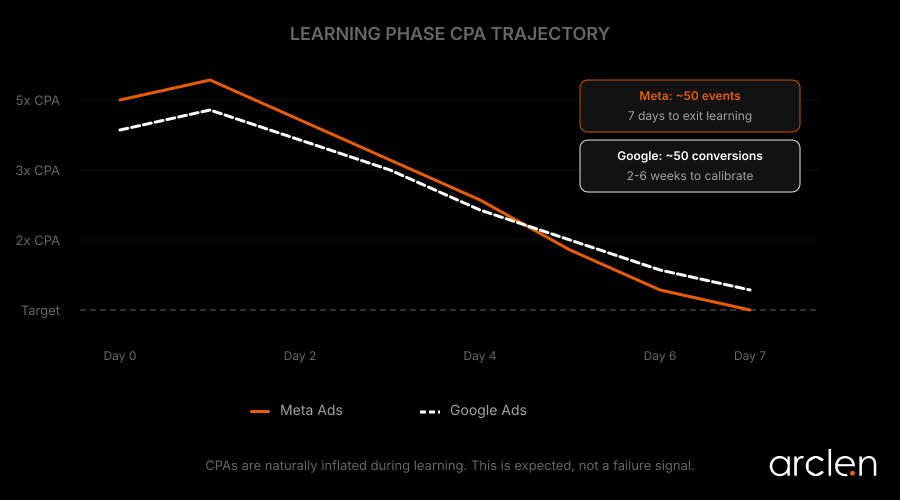
When you launch a campaign, both platforms enter a "learning phase." The algorithm tests different audiences, placements, and creative combinations to figure out who's most likely to convert. This phase looks terrible in your dashboard. That's by design.
On Meta, CPAs run 2–5x above your target for the first 1–3 days. A $30 target CPA showing up as $95? Normal. The system needs about 50 optimization events per ad set within 7 days to exit learning.
Quick math: if you're optimizing for purchases at a $25 CPA, you need a daily budget of at least $125 to generate enough data. Anything less, and you're stuck in permanent limbo — spending enough to lose money but never enough to optimize.
Google's Smart Bidding follows the same pattern. It needs around 50 conversions — or 3 full conversion cycles — before it calibrates. Google officially recommends running Performance Max campaigns for a minimum of 6 weeks before making judgments.
6 weeks. That's not a typo.
The "just one quick edit" trap
Here's where it gets painful.
You've been patient. You waited 4 days. But the CPA is still high, so you think: "I'll just tweak the audience a bit. Maybe swap in that other headline."
You just reset the clock to zero.
On Meta, budget changes greater than 20%, creative swaps, audience changes, or switching your optimization event all restart the learning phase. On Google, changing bid strategies, adjusting Target CPA significantly, or modifying conversion actions do the same thing.
It's like pulling a cake out of the oven every 5 minutes to check if it's done. You'll never get a finished cake. You'll just get a warm mess and a mounting electricity bill.
One agency documented a client who paused Google Ads after 2 weeks citing "no results." Plot twist: high-quality leads had been arriving between days 17 and 35 from the original click. When they relaunched, CPA came back 27% higher. The algorithm had to start learning from scratch.
The rule is simple: if you can't afford to let the learning phase finish, you can't afford to run the campaign. (And if the learning phase finishes and conversions still aren't coming — check whether it's the ad or the landing page.)
3 ways people kill winners too early
1. Panicking at day-2 CPA
We get it. Watching money disappear with nothing to show for it triggers something primal. But day-2 numbers are noise, not signal.
Meta's own data science team found that ads completing the learning phase achieve 19% lower CPA than those that don't. Even better — advertisers with fewer ad sets stuck in "Learning Limited" see 68% lower CPA overall.
The fix is boring. Set a calendar reminder for 7 days after launch. Don't touch the campaign before then unless tracking is broken or the landing page is down. That's it. No heroics required.
2. Tweaking during learning
We just covered this, but it bears repeating because everyone does it.
If you must make changes, batch them. All edits at once. Accept the learning reset. Then walk away for another 7 days.
Resist the urge to "optimize" your way through the learning phase. You're not optimizing. You're interrupting.
3. Judging with pocket change data
You flip a coin 3 times. Heads every time. Is the coin rigged?
Obviously not. The sample is too small to mean anything. And yet advertisers do exactly this with ads — 47 impressions, 3 clicks, 0 conversions, "it's not working."
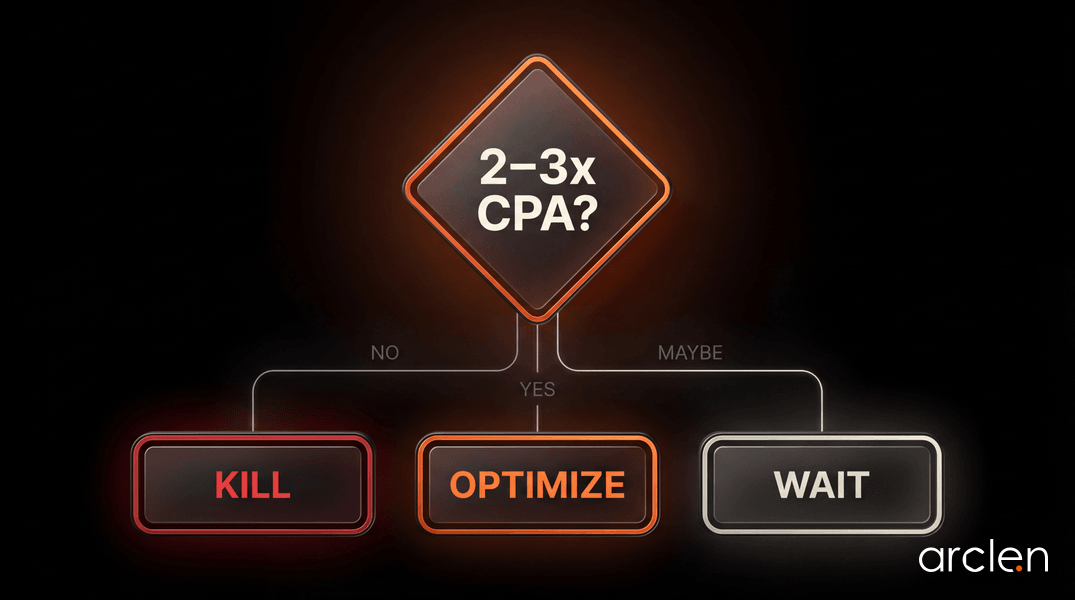
The widely accepted threshold: spend 2–3x your target CPA before making a kill decision. Target CPA of $50? Wait until you've spent $150 with 0 conversions. At $80 spent, you're not making a decision — you're making a guess.
3 ways people let losers bleed them dry
Killing too early is dramatic. Killing too late is quieter. And often more expensive — because you don't notice until the credit card statement arrives.
1. Creative fatigue (Meta's silent killer)
Picture this. Your ad crushed it in week 1. Great CTR. Solid conversions. You're feeling smart.
Week 3, things slow down. Week 4, CPA is 40% higher. You blame the algorithm. You blame iOS. You blame Mercury retrograde.
It's none of those. Your audience has seen the ad 4 times and they're over it.
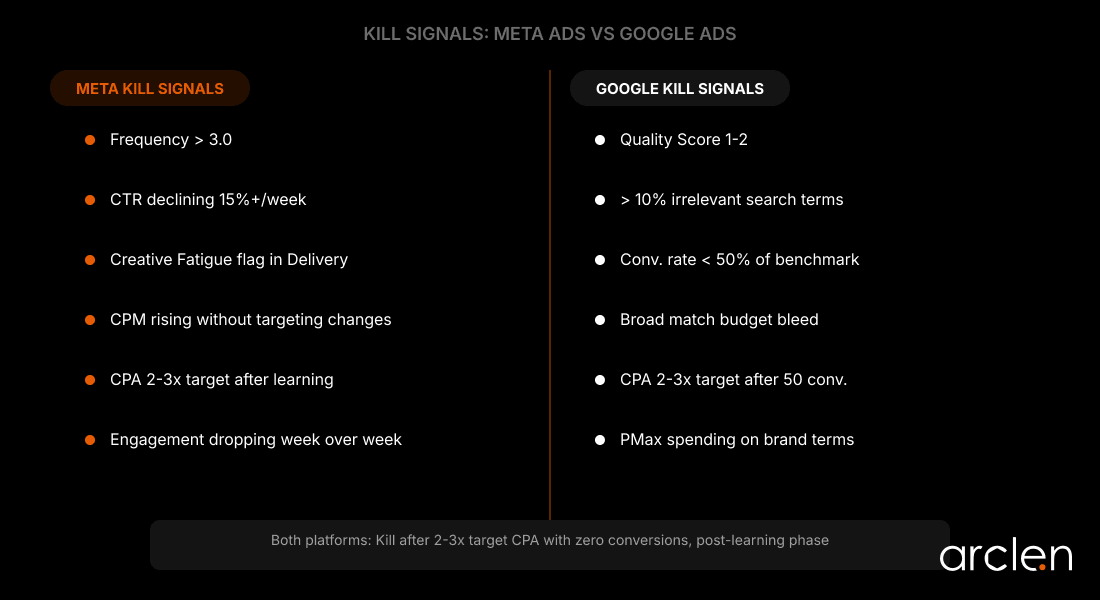
When frequency crosses 3.0, engagement drops. Meta's own research found that reducing creative fatigue improves conversion rates by 8%. The platform now flags "Creative Fatigue" and "Creative Limited" directly in the Delivery column — but most beginners don't know to look there.
The warning signs stack predictably: CTR declining week over week, CPC rising without targeting changes, frequency climbing past 3.
For prospecting campaigns, refresh creative every 2–4 weeks. If you're spending $100+/day, every 7–14 days. Your audience moves fast. Your creative needs to keep up.
2. Broad match eating your budget (Google's quiet thief)
Google defaults new keywords to broad match. Sounds helpful. It's not.
Your "personal trainer Vancouver" keyword? Broad match might show your ad to someone searching "personal training certification online free." You pay for the click. They bounce in 3 seconds.
Without weekly search term reviews and negative keyword additions, broad match quietly eats budget on irrelevant traffic. If more than 10% of your visible search terms need negating, your match types are too loose.
Check your search term report every Monday. It takes 10 minutes. Those 10 minutes will save you more money than any bid strategy change.
3. Performance Max hiding where the money goes
PMax is Google's "trust us, we'll handle everything" campaign type. It serves ads across Search, YouTube, Display, Gmail, Maps, and Discovery — all at once.
The problem: Google's placement report shows impressions only. No clicks. No conversions. No cost per placement. So when your budget disappears into random mobile game apps, you can't see it happening.
And here's the sneaky part. Without brand exclusions, PMax will happily capture conversions from people who already searched your brand name — conversions your branded search campaigns would've won at lower cost. It looks like PMax is performing brilliantly. It's just stealing credit.
Proactively exclude mobile app categories. Set brand exclusions. And don't trust PMax ROAS numbers at face value.
The kill framework (stick this on your wall)
Feelings are expensive. Use these 3 layers instead.
Layer 1 — The spending threshold
0 conversions after spending 2–3x your target CPA = kill it.
That's the rule. For high-ticket products with long consideration cycles, stretch to 4–5x. For low-ticket impulse buys, 1.5–2x is enough.
This only applies after the learning phase completes. High CPAs during learning are expected — they don't trigger the rule.
Layer 2 — The time minimum
Not all budgets generate data at the same speed. Match your patience to your spend:
- $500+/day: 3 days minimum
- $100–$300/day: 5–7 days minimum
- Under $100/day: 7–10 days minimum
- Performance Max: 6 weeks. No exceptions.
- After significant edits: 1–2 full conversion cycles
Layer 3 — The review cadence
Daily: Technical checks only. Is the campaign spending? Is tracking firing? Is the landing page live? That's all you're allowed to care about.
Weekly: Now you can analyze. CTR, CPC, conversion trends. Pause or replace tired creatives. Review Google search terms. Add negatives. This is decision day.
Monthly: Zoom out. Overall CPA, ROAS, budget shifts between campaigns.
Quarterly: Strategy level. Channel mix. New campaign types. Competitive landscape.
This cadence prevents both the "set and forget" problem and the "check every 30 minutes and spiral" problem.
Test the concept, not just the ad
Here's something most beginners miss: killing 1 ad isn't the same as killing the idea behind it.
Only about 6–7 out of every 100 ads tested turn out to be genuine winners. That means failure is the default, not the exception. But creative quality accounts for 56% of campaign performance — more than targeting or bid strategy.
So if you tested 1 version of a concept and it flopped, you didn't prove the concept is bad. You proved that execution didn't work.
The 60-30-10 rule for budget allocation:
Put 60% behind proven winners. 30% behind variations of those winners — different hooks, thumbnails, opening lines. And 10% behind completely new concepts.
Test 3–5 versions of an idea before you abandon it. The winning version might be the 4th attempt with a different opening frame. If you're not sure what makes a headline actually convert, start there.
Know your benchmarks (so you know what "bad" actually looks like)
Context matters. A $25 CPA might be incredible for one business and catastrophic for another. But knowing the averages helps you calibrate.
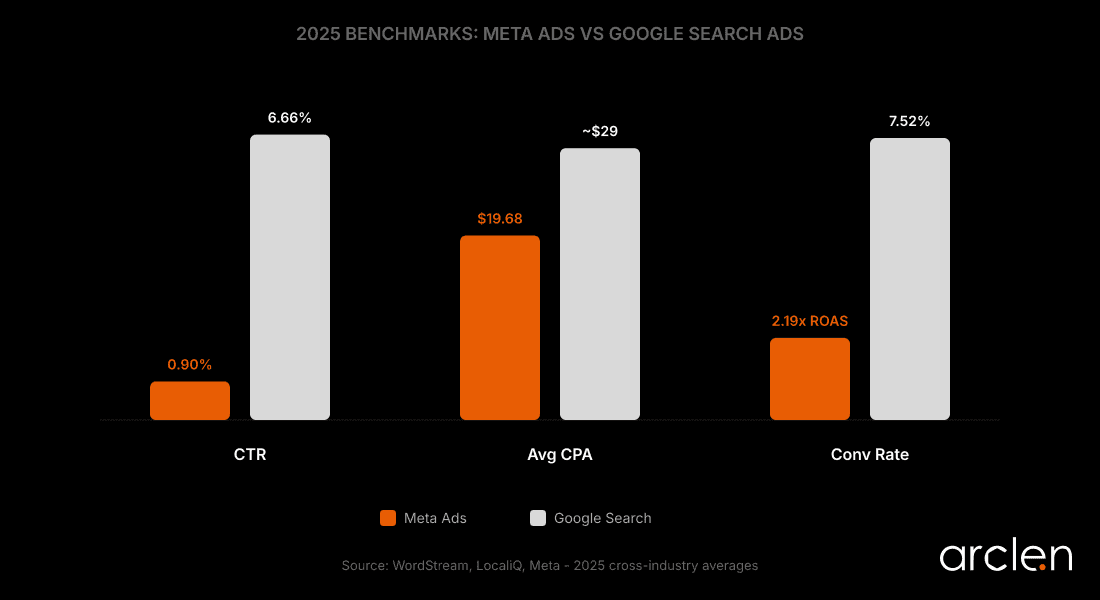
Meta Ads (2025 benchmarks):
- Average CPA across industries: ~$19.68
- Median ROAS: 2.19x (retargeting: 3.61x)
- Average CTR: ~0.90%
- Reels video CTR: 35% higher than other video formats
Google Search Ads (2025 benchmarks):
- Average CTR: 6.66%
- Average CPC: $5.26
- Average conversion rate: 7.52%
If your numbers are in the neighborhood, optimize — don't kill. If you're at half these benchmarks after collecting enough data, pause and diagnose before spending more.
Before you launch anything, decide these 4 things
Write them down. Literally. On paper, a Post-it, the back of a napkin — whatever keeps you from making emotional decisions at 11pm.
1. Your maximum CPA. Calculate from your average order value, gross margins, and the percentage of revenue you can allocate to ads. This is math. Not vibes.
2. Your minimum wait time. 7 days at minimum. Longer for low-budget campaigns.
3. Your kill threshold. 2–3x target CPA with 0 conversions = pause.
4. Your creative testing minimum. 3–5 executions before abandoning a concept.
When the panic hits — and it will — check the list. The list doesn't have feelings. The list has numbers.
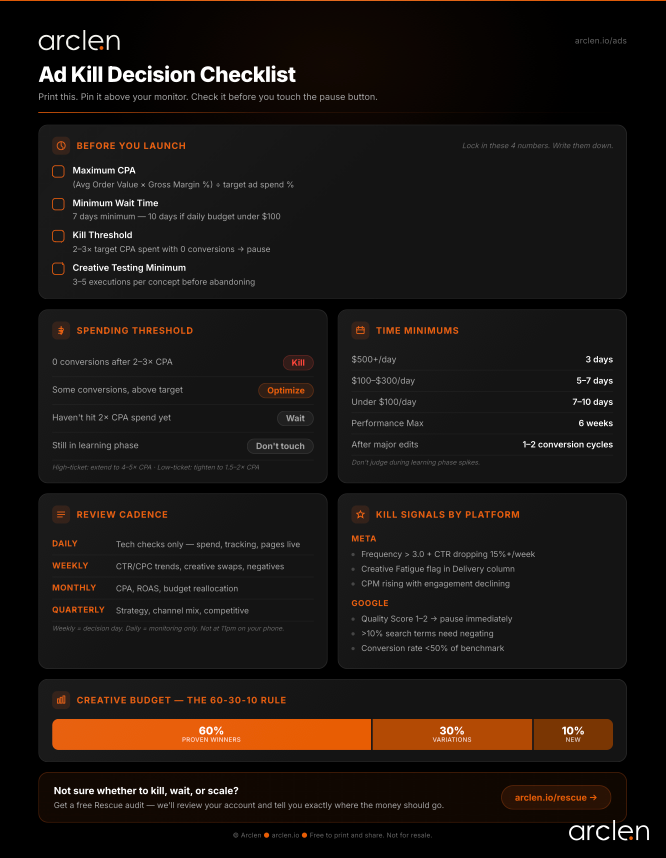
We turned this framework into a free one-page Ad Kill Decision Checklist — the spending thresholds, time minimums, review cadence, and creative testing rules on a single printable sheet. Grab it here and stick it next to your monitor.
And if you decide the ads aren't the problem — run your landing page through a copy audit before you spend another dollar on traffic.
The question that changes everything
Stop asking "Is this ad working?"
Start asking "Does this ad have enough data for me to know?"
That single reframe — from daily emotion to statistical readiness — is worth more than any targeting hack or creative template. The algorithm is smarter than your gut. But only if you give it enough time and data to finish thinking.
Your job isn't to outsmart the machine. It's to feed it properly, read the signals honestly, and have the discipline to act on data instead of anxiety.
If your campaigns are underperforming and you can't tell whether the problem is the ad or the page — run a free page diagnosis. Arclen scans your landing page and shows you exactly where the message breaks. Specific fixes, not generic advice. 2 minutes.
Related reading
- Why Your Ads Convert But Your Landing Page Doesn't
- Your Headlines Are Losing You Money. Here's the Data.
- Landing Page Copy Audit Checklist: 17 Elements to Check
FAQ
At minimum, 7 days — or until the ad set exits the learning phase (roughly 50 optimization events). For campaigns under $100/day, wait 7–10 days. Don't judge performance during the first 1–3 days when CPAs are naturally inflated.
Spend 2–3x your target CPA before deciding. If your target CPA is $50 and you've spent $150 with 0 conversions after the learning phase, pause it. For high-ticket products with long sales cycles, extend to 4–5x.
Watch for frequency crossing 3.0, CTR declining week over week, and CPC rising without targeting changes. Meta also flags "Creative Fatigue" and "Creative Limited" in the Delivery column of Ads Manager.
Google recommends a minimum of 6 weeks. PMax uses machine learning across Search, Display, YouTube, Gmail, Maps, and Discovery simultaneously — it needs that time to gather enough conversion data to optimize.
Keywords scoring 1–2 should be paused. For 3–4, optimize ad copy and landing page relevance first. Exception: if a low-QS keyword converts profitably with positive ROAS, keep it — the business outcome matters more than the score.

Written by Cam Rickerby
Founder at Arclen. Builds AI-powered conversion tools for marketers and agencies. Former growth lead. Obsessed with the gap between what data says works and what most landing pages actually do.
Get insights like this in your inbox
Data-backed marketing insights. No spam. Unsubscribe anytime.